Best Guide to Choosing a Face Identification SDK That Delivers Real Accuracy
Picking the right face identification SDK often feels like trying to unlock a door with a bucket of keys. Everything looks shiny on the surface, yet only a few options work reliably when real users step in front of the camera. This guide breaks everything down in a simple and friendly way so you know what matters before committing to a system. By the end, you will understand accuracy benchmarks, privacy rules, liveness checks, developer requirements and real examples that show what good performance looks like.
How a Face Identification SDK Works Behind the Scenes
A modern engine behaves like a fast and organized librarian. It takes a face, turns it into a unique pattern and compares that pattern against stored references. The speed can be surprising because the entire process often finishes in the time it takes to blink.
Developers usually rely on independent testing programs to judge real performance. The most trusted benchmark comes from the NIST evaluations. You can explore the official program through this trusted benchmark resource. If you want a deeper view of how algorithms behave in one-to-one matching, the detailed test overview gives clear insight into accuracy and robustness.
Why Face Identification Helps Modern Businesses
Many industries depend on facial identification because it helps them shorten queues, improve security and offer a smoother experience. Airports verify travelers without slowing down lines. Banks allow safe sign-ins without forcing users to remember passwords. Retail teams use it to manage store traffic and improve customer flow. Healthcare clinics rely on it to organize patient access more safely.
Systems like these need trustworthy privacy practices. Anyone working with biometric data should understand the responsibilities involved. You can find helpful guidance in the complete privacy reference, which explains how sensitive information must be handled.
What to Compare When Choosing a Face Identification SDK
Here is a simple and practical list to help you compare vendors with confidence.
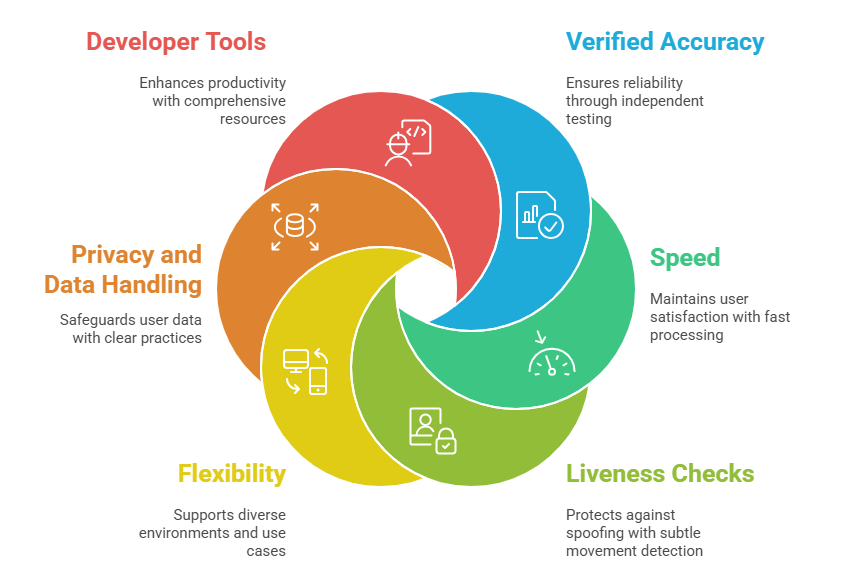
1. Verified Accuracy from Independent Tests
Accuracy decides whether your system builds trust or frustration. The NIST evaluations mentioned earlier help you see how engines behave under different lighting, skin tones and environmental conditions. They also help you avoid tools that only perform well in promotional videos.
2. Speed When Traffic Gets Heavy
Fast systems keep your users happy. A slow engine creates long queues and more complaints. A well-optimized tool identifies faces smoothly, even on older devices or in crowded situations. Good speed often feels invisible, like doors that open exactly when you step toward them.
3. Strong Liveness Checks for Extra Protection
Without liveness checks, attackers can trick your system with printed photos or bright screens. Liveness acts like a careful guard who notices subtle movements, texture signals and natural reactions that fake inputs cannot easily mimic. When this layer is strong, spoof attempts drop sharply.
4. Flexibility Across Platforms
Some products depend on offline environments, while others rely on cloud scale. A flexible vendor helps you support both so you can adapt to different locations and use cases. Teams often choose hybrid setups when they want privacy locally but still need global performance.
5. Privacy and Data Handling Support
Responsible handling of biometric data protects your users and shields your business from trouble. Vendors should offer clear practices, retention rules and secure handling. The GDPR resource linked earlier is a helpful roadmap for planning everything correctly.
6. Helpful Tools for Developers
Clean documentation, example code and sandbox environments make your developers more productive. Deep dive examples often save hours. For teams exploring computer vision ideas or open resources, the open source collection is a practical place to learn patterns and test concepts.
Quick Table for Comparing Vendors
| Feature | High Value | Additional Benefit |
| Verified accuracy | More reliable results | Expanded test coverage |
| Fast matching | Smooth experience | Energy-efficient mode |
| Strong liveness | Better fraud protection | Multi-signal checks |
| Privacy compliance | Legal confidence | Regional templates |
| Clean documentation | Faster integration | Demo sample apps |
| Cross-platform support | Broader use cases | Device tuning tools |
This table gives you a simple way to narrow down your options early.
Case Example of a Smooth Integration
A logistics company struggled with slow morning entry because workers forgot badges and manual checks caused long lines. The team explored engines and compared them using NIST benchmark results. Their warehouse had odd lighting near sunrise, so they focused on tools that performed well in mixed brightness.
After selecting a strong engine, entry delays disappeared. Liveness checks stopped spoof attempts and the whole flow felt more natural. Workers even joked that the system felt like a guard with perfect eyesight. Productivity improved because shift changes became smooth again.
Best Practices for Getting Strong Accuracy
Good habits make engines perform better in any environment.
- Use steady lighting during enrollment
- Ask users to hold the camera still
- Refresh stored images when needed
- Limit background clutter
- Combine liveness and recognition for better protection
Small improvements here lead to more accurate and stable results.
Trends Shaping the Future of Face Identification
Artificial intelligence keeps pushing boundaries. Passive liveness is rising because people prefer natural movement instead of instructions. Deepfake detection continues to evolve as attackers try to create synthetic videos. Platforms also mix document checks, behavioral signals and biometric tools to build stronger identity verification layers.
Final Thoughts on Choosing a Face Identification SDK
A dependable face identification SDK should offer verified accuracy, smooth performance, privacy support and clean developer tools. Independent testing builds confidence while real-world trials help you understand how well a tool fits your workflow. When you combine these steps with responsible data handling, you find a solution that supports your users and your product.
If you want to explore advanced tools during your final evaluation stage, you can take a look at Recognito for a complete experience.