A project closes. The team celebrates delivery. A week later, finance is still chasing timesheets. Revenue sits unbilled. Costs are estimated, not confirmed. Margins look healthy on paper, but no one trusts the numbers.
This is not a tooling problem. It is a systems problem.
Most professional services firms run project delivery and accounting on loosely connected platforms. Data moves through exports, spreadsheets, and manual reconciliations. By the time leadership sees financial insight, it is already outdated.
If you are exploring how to automate accounting and project management in PSA, the goal is not convenience. The goal is financial control at the speed of delivery.
This guide breaks down the architecture, workflows, and operational shifts required to make automation real.
Why PSA Automation Fails in Most IT Services Firms
Before discussing automation, it is important to confront a few uncomfortable truths:
- Projects and finance are often modeled differently
- Revenue recognition rules are configured after project setup
- Time, expenses, and billing data follow different approval chains
- Integrations are one-directional and batch-based
When systems are misaligned at the data layer, automation only amplifies errors.
True automation begins with structural alignment.
Step 1: Create a Unified Project–Finance Data Model
The foundation of automating accounting and project management in PSA is a shared data structure.
Project and financial objects must reference the same:
- Client record
- Contract terms
- Billing model
- Cost categories
- Revenue rules
- Resource rate cards
If your PSA and accounting system maintain separate definitions for these entities, reconciliation will always be manual.
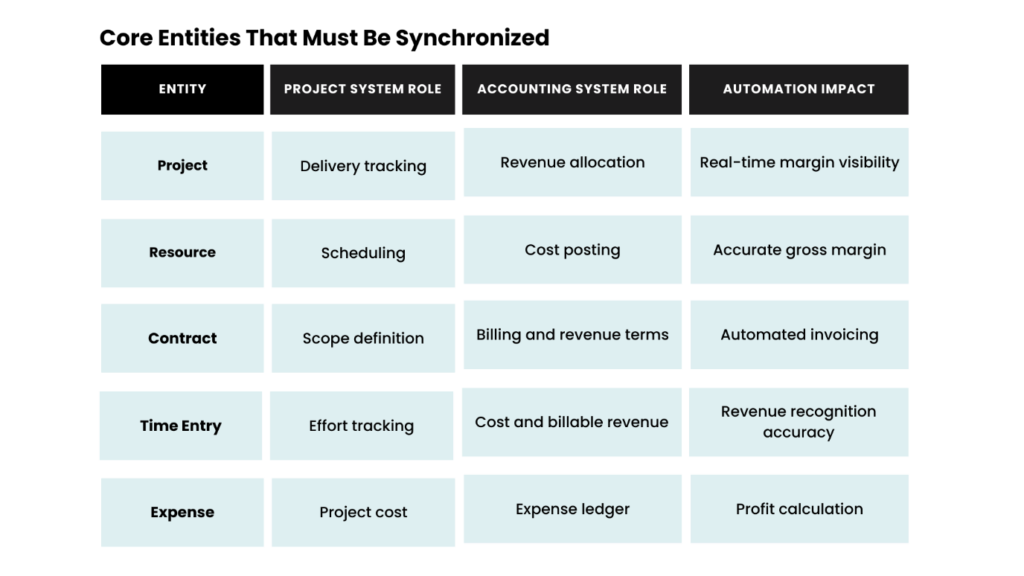
Without this mapping, financial reporting becomes reactive instead of predictive.
Step 2: Automate Time and Cost Capture at Source
Manual time entry reviews and cost adjustments delay revenue and distort profitability.
Automation here requires:
- Mandatory time entry tied to active tasks
- Auto-validation of rate cards during submission
- Real-time cost accrual based on resource role
- Expense uploads directly linked to project codes
When time entries automatically generate:
- Billable revenue
- Internal cost postings
- WIP updates
Finance no longer waits for end-of-month corrections.
This is where many PSA implementations fall short. They capture time. They do not operationalize it.
Step 3: Automate Revenue Recognition Rules
Revenue leakage often hides in fixed-fee and milestone-based projects.
To automate accounting and project management in PSA effectively, revenue recognition logic must be embedded at project creation.
Configure:
- Fixed price projects with percentage-of-completion logic
- Milestone billing tied to delivery events
- T&M projects with auto-invoice generation cycles
- Retainers with recurring revenue schedules
Revenue recognition should not rely on manual journal entries.
It should be rule-driven and triggered by:
- Approved time entries
- Milestone status updates
- Contract amendments
When done correctly, finance teams shift from calculating revenue to auditing exceptions.
Step 4: Automate Billing and Invoicing Workflows
Disconnected billing processes are the single biggest friction point between project and finance teams.
An automated PSA environment ensures:
- Invoice drafts are generated from approved time and expenses
- Tax rules are auto-applied based on region
- Multi-currency conversions are system-driven
- Approval workflows are tracked inside the platform
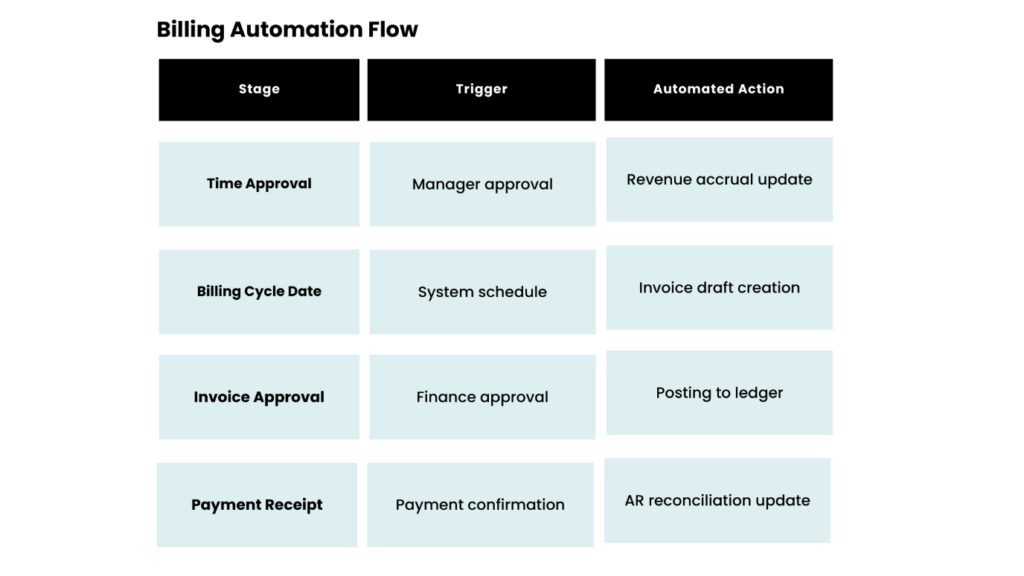
When billing is automated, DSO reduces. Cash flow improves. Forecast accuracy increases.
Step 5: Build Real-Time Margin Intelligence
Automation is incomplete without visibility.
Once accounting and project management are unified:
- Project margin updates dynamically
- Resource utilization ties directly to profitability
- Forecasted revenue reflects actual effort
- Budget overruns trigger alerts
Leadership no longer waits for month-end reporting. They see risk as it forms.
This is where most firms underestimate PSA automation. It is not about efficiency alone. It is about predictive financial control.
Step 6: Replace Batch Integrations with Event-Driven Architecture
Many organizations claim automation because their PSA syncs nightly with their accounting system.
Nightly sync is not automation. It is delayed alignment.
True automation uses:
- API-based real-time updates
- Event triggers on status changes
- Error logging with exception handling
- Bi-directional data validation
When a project status changes, accounting reflects it instantly. When finance updates payment status, project dashboards update immediately. This closes the operational loop.
What Automation Actually Changes
When accounting and project management operate as one system:
- Revenue is predictable
- Margins are defendable
- Audit trails are complete
- Forecasts reflect delivery reality
- Leadership decisions are data-backed
Automation does not eliminate finance teams. It elevates them.
Final Thoughts
Automation is not a feature. It is an operating model.
Firms that treat PSA as a scheduling tool miss its financial power. When structured correctly, PSA becomes the system of financial truth for professional services organizations.
Most IT leaders focus on dashboards. Few question the integrity of the data feeding them.
That is where transformation actually begins.
About Kytes
Kytes AI-enabled PSA + PPM software unifies project delivery, accounting automation, revenue recognition, and financial forecasting within a single architecture.
It is designed for firms that want financial clarity at project speed. Book a strategy walkthrough with Kytes and see how your PSA can move from tracking projects to controlling profitability.